

Corporate Weirdness
MICROSOFT DIDN’T JUST BACK UP YOUR FILES. IT MOVED THEM INTO A CLOUD SYSTEM WITH AI TRAINING FINE PRINT.
Audio edition
OneDrive was sold as backup, but the fine print shows a shift from local files toward cloud-managed access, sync rules, account dependency, and AI policy language.
You probably agreed to OneDrive before you understood what it was.
That is the trick.
Microsoft presents OneDrive as protection, backup, convenience, and “access your files anywhere.” Most users are not thinking about sync architecture, online-only placeholders, account closure, storage quotas, Copilot access, or AI-training language in the privacy policy when they set up a new Windows machine or click through a backup prompt.
Microsoft is counting on that gap.
OneDrive does not need to steal your files. It only has to move familiar folders into a cloud-managed system, make the local PC feel normal, and leave the fine print to explain that access now depends on sync state, account status, service rules, and product-specific AI policies. The uploaded draft’s core frame is right: this is not just “backup.” It is a shift from local possession to service-managed access.
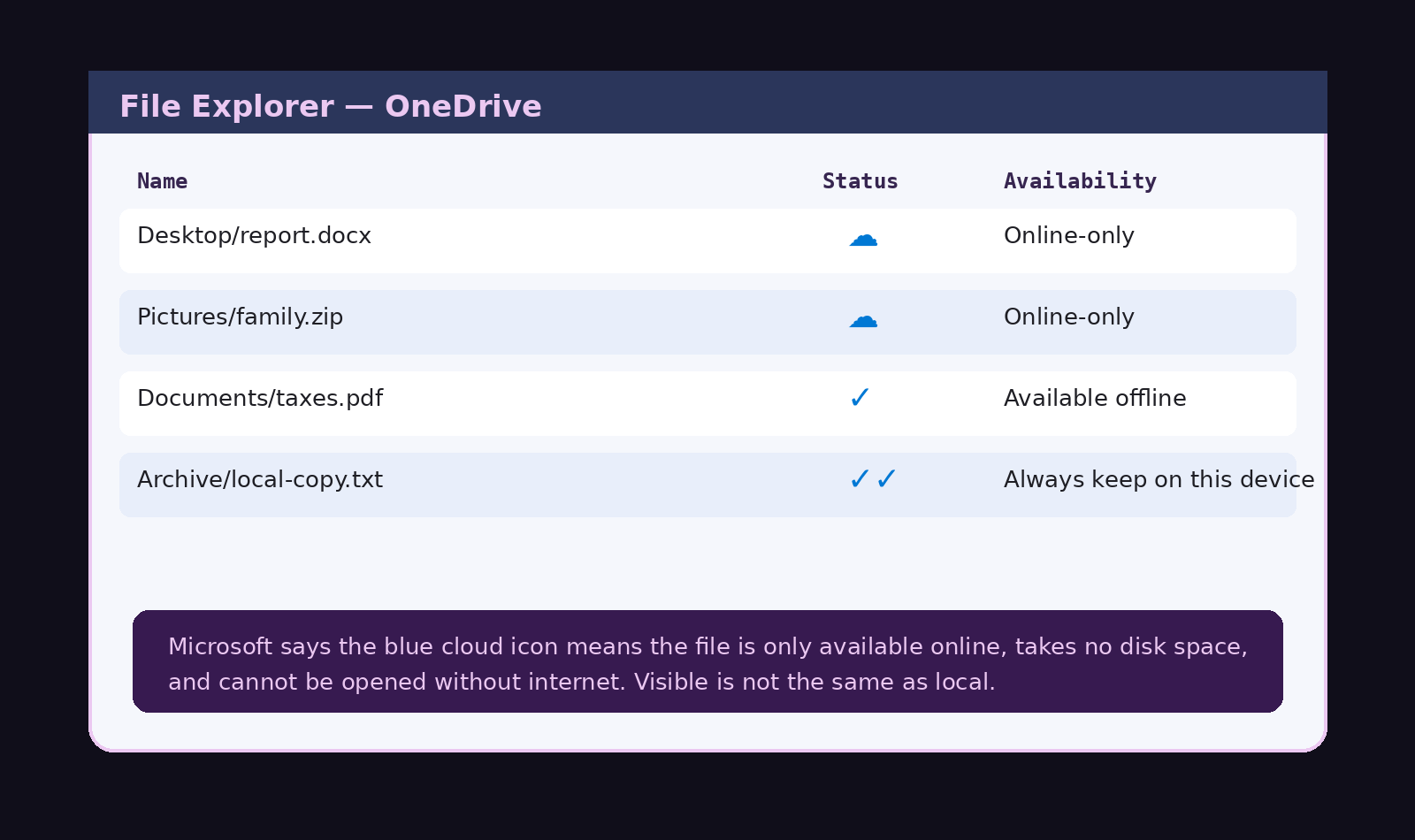
*The file appears local. The icon says otherwise.*
THE TIMELINE
Files On-Demand changes what visible files mean.
Microsoft’s Files On-Demand lets OneDrive files appear in File Explorer without fully existing on the local machine. Microsoft says online-only files show in File Explorer, do not take up space, do not download until opened, and cannot be opened without internet.
Desktop, Documents, and Pictures move into the sync relationship.
Microsoft tells users to back up folders like Desktop, Documents, and Pictures through OneDrive. When files finish syncing, Microsoft says they are backed up and can be accessed from anywhere, and Desktop items can “roam” to other desktops running OneDrive.
Exit becomes a choice between cloud-only and PC-only states.
Microsoft’s own instructions say that when users stop folder backup, they may choose to keep files only in OneDrive, removing them from the computer, or keep files only on the PC, removing them from OneDrive.
Files can become online-only again.
Microsoft says locally available files can be changed back to online-only, and Storage Sense can make files online-only after the selected time period.
Uninstall is not always an exit.
Microsoft says OneDrive is built into some versions of Windows and cannot be uninstalled there; users can hide it and stop the sync process instead.
Account closure can cut off access.
Microsoft says if an account is closed, access to services stops immediately and associated content may be deleted or disassociated unless legally required otherwise. Microsoft also tells users to maintain a regular backup plan because it cannot retrieve content after account closure.
The cloud file system sits under AI-training language.
Microsoft’s Privacy Statement says, “we may use your data to develop and train our AI models,” and also says Microsoft processes OneDrive documents so users can retrieve, delete, edit, forward, or otherwise process them as part of the service.
Files become AI-readable when invoked.
Microsoft says Copilot in OneDrive can summarize files stored in OneDrive without opening them individually, and can compare two or more files.
That is the system.
WHAT IT DID / DID NOT DO
What Microsoft did
- Made OneDrive files appear inside File Explorer like normal local files.
- Created online-only files that appear locally but do not occupy normal local disk space until opened.
- Encouraged users to route Desktop, Documents, Pictures, and other important folders into OneDrive backup.
- Allowed backup-stop choices where files can remain only in OneDrive or only on the PC.
- Made local availability depend on sync state, icon state, Storage Sense, account status, storage quota, and service availability.
- Made OneDrive hard to fully remove in some Windows versions, where Microsoft says it can only be hidden and stopped from syncing.
- Wrote broad privacy language saying Microsoft may use user data to develop and train AI models.
- Built Copilot features that can summarize, compare, and answer questions from OneDrive files when invoked.
What the record does not show
- It does not show that Microsoft claims ownership of your files.
- It does not show that every OneDrive file is automatically online-only.
- It does not show that Microsoft automatically trains AI on every private OneDrive file.
- It does not show that every Windows file is moved to Microsoft’s servers.
- It does not show that users cannot keep files local.
- It does not show that OneDrive is useless as a backup.
That distinction matters.
The strongest claim is not “Microsoft owns your files.”
The strongest claim is sharper: Microsoft moved many users’ files from local possession toward account-based access, then placed that cloud file system inside a broader AI and service-policy stack.
CLAIMS ON THE RECORD
Microsoft says the blue cloud icon means a file is only available online, does not take space on the computer, and cannot be opened without internet. That means “visible in File Explorer” no longer equals “stored on this machine.”
A traditional backup leaves the original in place and creates a second copy. OneDrive folder backup can place familiar folders into a synced service relationship, and stopping backup can force the user to choose whether files remain only in OneDrive or only on the PC.
Microsoft says OneDrive is built into some Windows versions and cannot be uninstalled there. The user can hide it and stop sync instead. That is not a clean exit. That is a workaround.
Microsoft says user content remains theirs, but its Privacy Statement says Microsoft processes OneDrive documents as part of the service, and its Services Agreement can end access after account closure. The file may be yours, but the route to it may belong to the service.
Microsoft’s Privacy Statement says Microsoft may use user data to develop and train AI models. That does not prove every OneDrive file is training data. It proves the cloud file system now lives under a privacy framework that includes AI-training language.
That is the pressure point.
Not theft.
Not magic remote deletion.
Cloud-managed possession.
Service-controlled access.
AI-adjacent processing.
Fine print doing the quiet work.
WHAT ACTUALLY HAPPENS IN COMMON SCENARIOS
- Files On-Demand is on: A file can appear in File Explorer but download only when opened. It may be online-only, take no disk space, and require internet to open.
- “Always keep on this device” is used: Microsoft says those files download to the device, take up space, and are always available offline. This is closest to the old hard-drive model.
- You stop folder backup: Microsoft gives a choice: keep files only in OneDrive, removing them from the computer, or keep files only on the PC, removing them from OneDrive. If the folder has cloud-only files, Microsoft says users may need to download them first by changing their state to “Always keep on this device.”
- You stop backup on Mac: Microsoft says files already backed up by OneDrive stay in the OneDrive folder and no longer appear in the device folder. Users may see a “Where are my files?” shortcut and must manually move files back if they want them in the device folder.
- You delete an online-only file locally: Microsoft says deleting an online-only file from the device deletes it from OneDrive on all devices and online, with recovery available from the OneDrive recycle bin for a limited period.
- Your account closes: Microsoft says service access stops immediately and associated content may be deleted or disassociated. Local downloaded copies may survive, but online-only files and cloud-only content depend on the account and service path.
- Copilot is used on a file: Microsoft says Copilot in OneDrive can summarize OneDrive files without opening them one by one. The file becomes usable as AI input in that session.
This is where viral versions get sloppy.
Microsoft is not magically erasing every local drive.
The precise problem is worse because it is ordinary: users may believe they have local files when they actually have service-managed files, placeholders, synced copies, or AI-readable cloud objects.
THE OPT-OUT MAZE
Opting out is possible.
That is not the same as easy.
Microsoft’s own support page is called “Turn off, disable, or uninstall OneDrive.” It says OneDrive is built into some versions of Windows and cannot be uninstalled there. Microsoft’s solution is to hide it and stop the sync process.
That is not a clean exit.
That is containment.
To get out, a user may have to:
- unlink the PC;
- stop folder backup;
- choose whether files stay only in OneDrive or only on the PC;
- check which files are online-only;
- mark needed files Always keep on this device before disconnecting;
- remove or hide OneDrive from File Explorer;
- uninstall OneDrive only where Windows allows it;
- separately delete cloud copies if they want them gone from Microsoft’s servers.
Microsoft documents these as separate tasks.
There is no obvious “make my files local again and remove OneDrive from my life” button.
The wording matters.
“Turn off backup” does not simply mean “leave my files exactly where they are.” Microsoft says stopping folder backup can mean keeping files only in OneDrive and removing them from the computer, or keeping them only on the PC and removing them from OneDrive.
“Unlink this PC” does not mean “delete OneDrive from my life.” Microsoft’s own disable instructions put unlinking, hiding, stopping sync, and uninstalling into separate steps, with uninstall unavailable in some Windows versions.
So yes, users can opt out.
But the exit path requires them to understand sync state, placeholder files, folder redirection, local copies, cloud copies, account linking, and deletion propagation.
That is not informed consent.
That is a maze with a friendly blue cloud icon.
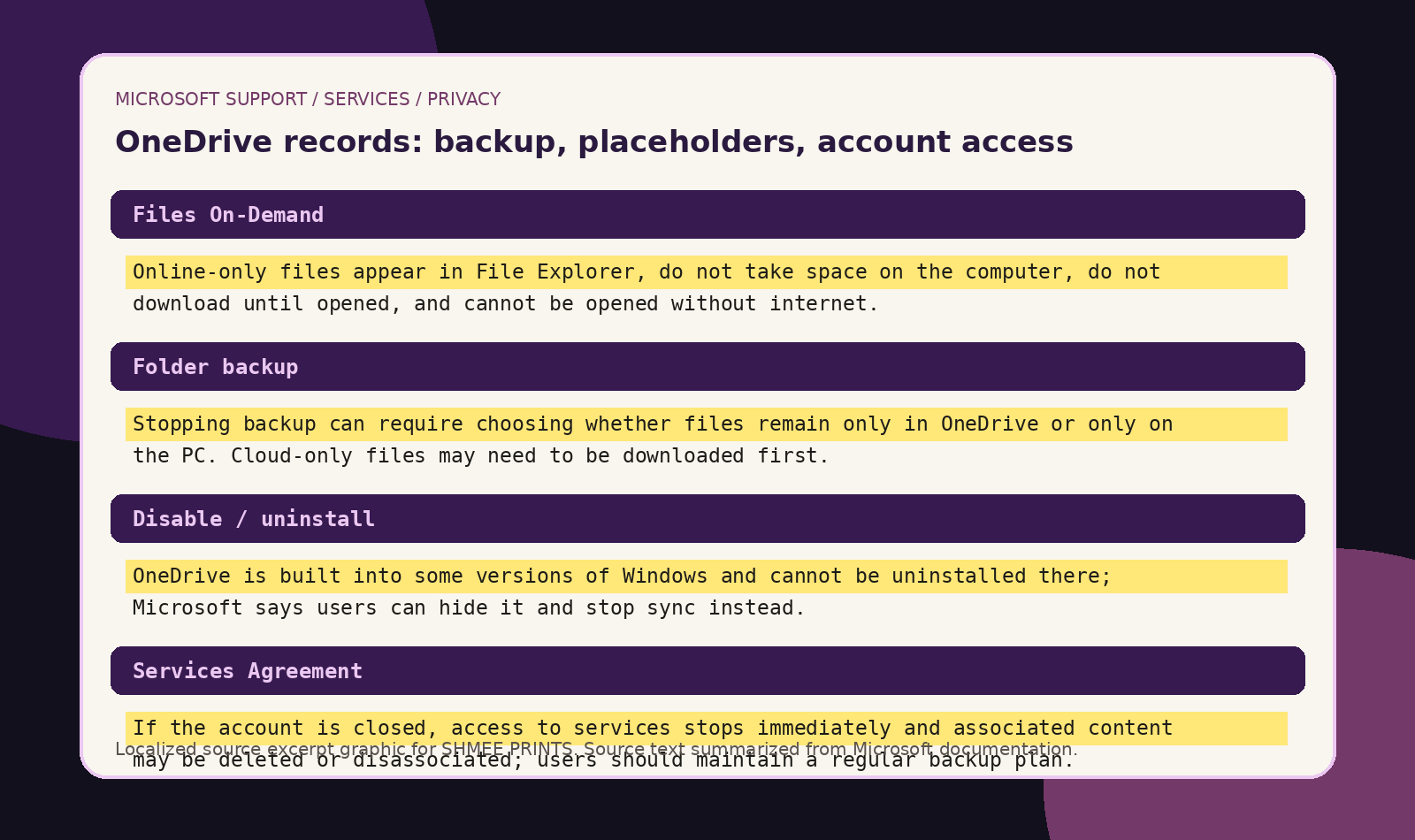
*Microsoft’s own documentation splits the simple folder into sync state, account state, service rules, and AI policy language.*
WHAT HAPPENED
Microsoft blurred three categories users used to understand separately.
Storage.
Backup.
Access.
A file saved on a hard drive used to mean the file lived on the machine.
A backup used to mean another copy existed somewhere else.
OneDrive changed the model.
A file can appear in File Explorer while depending on download state, cloud status, Storage Sense, sync rules, and account access. Microsoft says online-only files are visible locally, download when opened, and can later be made online-only again.
That changes the meaning of the folder.
Desktop is no longer necessarily just a local location.
Documents is no longer necessarily just a local folder.
Pictures is no longer necessarily just a local library.
They can become cloud-synced service surfaces.
Then Microsoft added the AI layer.
Copilot in OneDrive can summarize files stored in OneDrive, including files shared by or with the user, and can compare multiple files without opening and closing them individually.
That changes the meaning of the file.
It is not only stored.
It can be processed as input.
WHY THIS MATTERS
The word “backup” hides the tradeoff.
Backup means redundancy.
Sync means mirroring.
Access means permission.
A backup protects against loss because separate copies exist.
A sync can spread deletion or confusion because the same system reflects changes across locations.
A cloud access system can fail even when the laptop is fine.
Microsoft’s Services Agreement makes the boundary clear: if an account closes, access stops immediately, content may be deleted or disassociated, and Microsoft says users should maintain a regular backup plan because it cannot retrieve content after account closure.
That is Microsoft admitting the real hierarchy.
OneDrive is useful.
OneDrive is not the same as an offline archive.
The AI clause makes the control issue sharper.
Microsoft says it may use user data to develop and train AI models, while also processing OneDrive documents as part of the service.
That does not prove every OneDrive document trains AI.
It proves the user is no longer standing on a hard-drive boundary.
The user is standing inside a policy stack.
WHAT THE RECORD SHOWS
Microsoft says online-only files appear in File Explorer, do not take up space, do not download until opened, and cannot be opened without internet.
Microsoft says only files marked Always keep on this device are always available offline.
Microsoft says stopping backup can mean keeping files only in OneDrive and removing them from the computer.
Microsoft says OneDrive is built into some Windows versions and cannot be uninstalled there.
Microsoft says it processes uploaded OneDrive documents so users can retrieve, delete, edit, forward, or otherwise process them as part of the service.
Microsoft’s Privacy Statement says it may use user data to develop and train AI models, and that automated processing can include AI.
Microsoft says account closure ends the right to access services immediately, and associated content may be deleted or disassociated.
Microsoft says uploaded files are stored securely for up to 18 months and treated like any other conversation, subject to user choices about model training and personalization.
Microsoft says Microsoft 365 Copilot uses Azure OpenAI services, not OpenAI’s public services, and that prompts, retrieved data, and generated responses remain inside the Microsoft 365 service boundary.
WHAT THE RECORD DOES NOT SHOW
The record does not show that Microsoft automatically trains AI models on every private OneDrive file.
The record does not show that every Windows user has cloud-only files.
The record does not show that OneDrive is never useful.
The record does not show that Microsoft 365 Copilot work/school data is used to train foundation LLMs. Microsoft says Microsoft 365 Copilot data remains inside the Microsoft 365 service boundary and uses Azure OpenAI services, not OpenAI’s public services.
The record does not show that Copilot in Microsoft 365 apps for home uses file contents to train foundation models. Microsoft says prompts, responses, and file contents in those apps are not used to train foundation models.
The record does show something more precise.
Microsoft has different rules for different layers:
- OneDrive storage;
- Files On-Demand;
- folder backup;
- sync selection;
- account unlinking;
- uninstall limitations;
- Services Agreement access;
- Privacy Statement AI-training language;
- consumer Copilot file uploads;
- Microsoft 365 Copilot foundation-model exclusions;
- Copilot in OneDrive file summarization.
The user sees one folder.
The documents describe multiple legal and technical states.
That is the problem.
THE AI TRAINING CLAUSE
The key sentence is Microsoft’s.
“We may use your data to develop and train our AI models.”
That sentence is broad.
It does not say, “every OneDrive file trains AI.”
It says user data may be used to develop and train AI models.
The same Privacy Statement says Microsoft processes OneDrive documents so users can retrieve, delete, edit, forward, or otherwise process them as part of the service.
That is the structure.
OneDrive content is processed.
User data may train AI models.
Product-specific promises narrow some cases.
The user has to know which case they are in.
That is not a simple consent model.
That is a permissions maze with a blue cloud icon.
THE COPILOT WORDING TRICK
The phrase “not used to train foundation models” is narrow.
It does not mean AI never touches your file.
It does not mean the file is never processed.
It does not mean the file is never summarized, compared, indexed, scanned, or used as context.
Microsoft says Copilot in Microsoft 365 apps for home can use content in the file the user is working in, or another file the user asks it to look at, while also saying prompts, responses, and file contents are not used to train foundation models.
That is the distinction.
Runtime access is not training.
Processing is not ownership.
Foundation-model training is not every kind of AI use.
Microsoft can say “not used to train foundation models” while the file is still read and used to answer the prompt.
That may be technically accurate.
It is also far more specific than the average user thinks when they hear, “your data is private.”
THE PRECEDENT
This is the same ownership-to-access shift that already hit movies, music, software, games, and digital books.
First, the user owns the thing.
Then the user owns access.
Then access requires an account.
Then the account requires compliance.
Then the content requires a server.
Then the server gets AI features.
Now the model reaches personal files.
The old hard-drive model was possession.
The new model is permission.
The file may be visible.
The copy may not be local.
The service may scan or process it.
The account may control access.
The AI may analyze it when invoked.
The privacy statement may allow user data to train AI models.
That is the precedent.
Not seizure.
Dependency.
WHY THIS CHANGES EVERYTHING
The hard drive used to be the boundary.
Now the boundary is Microsoft’s policy language.
If the file is local, the machine controls access.
If the file is online-only, the service controls access.
If the folder is backed up, it may be inside OneDrive’s sync system.
If sync reflects deletion, “backup” can behave like a mirror.
If the account closes, access can end.
If Copilot touches the file, the file becomes AI input.
If user data falls under AI-training language, the answer depends on product category, account type, privacy setting, and Microsoft’s carve-outs.
That is the shift.
The user still owns the content.
But ownership is no longer enough.
The real questions are:
- Is the file local?
- Is it online-only?
- Is it marked Always keep on this device?
- Is it synced?
- Is it indexed?
- Is it scanned?
- Is it accessible to Copilot?
- Is it consumer Copilot or Microsoft 365 Copilot?
- Is it covered by a “foundation model” exclusion?
- Is it covered by the broader Privacy Statement?
The public thought it was buying storage.
It was entering a service architecture.
THE PATTERN HARDENS
Cloud sync is sold as “access your files anywhere.”
Desktop, Documents, and Pictures move into the service relationship.
Files On-Demand saves disk space while the file appears local but may be online-only.
Unlink. Hide. Stop sync. Stop backup. Choose cloud-only or PC-only. Download cloud-only files first. Manually move files back.
The Services Agreement defines account closure, service cancellation, outages, and backup responsibility.
The Privacy Statement says user data may be used to develop and train AI models.
Summarize. Compare. Ask questions. Reference OneDrive files.
Not used for foundation models here. May be used for training there. Stored up to 18 months in another context. Opt-out choices somewhere else. Enterprise boundary somewhere else.
The user sees one folder.
The policy stack sees a hundred conditions.
That gap is the story.
WHAT SURVIVED
What survives offline is what is actually local.
Microsoft’s Files On-Demand documentation makes the practical line clear: online-only files must be downloaded before they become locally available, and only always-available files are guaranteed to be there offline.
What survives service failure is what is not dependent on the service.
Microsoft tells users to maintain a regular backup plan because it cannot retrieve content once the account is closed.
What survives legally is narrower than people assume.
Microsoft says your content remains yours, but the Services Agreement and Privacy Statement define how content and data are processed, accessed, protected, improved, synced, and governed.
What survives in the AI record is the split.
Microsoft’s broad Privacy Statement says user data may train AI models. Microsoft 365 Copilot documents describe specific service-boundary and foundation-model exclusions. Consumer Copilot documents say uploaded files are treated like conversations and subject to user choices about model training and personalization.
That is the final shape.
Microsoft did not need to claim ownership.
It moved the file into a service system.
Then it wrote the rules for the service system.
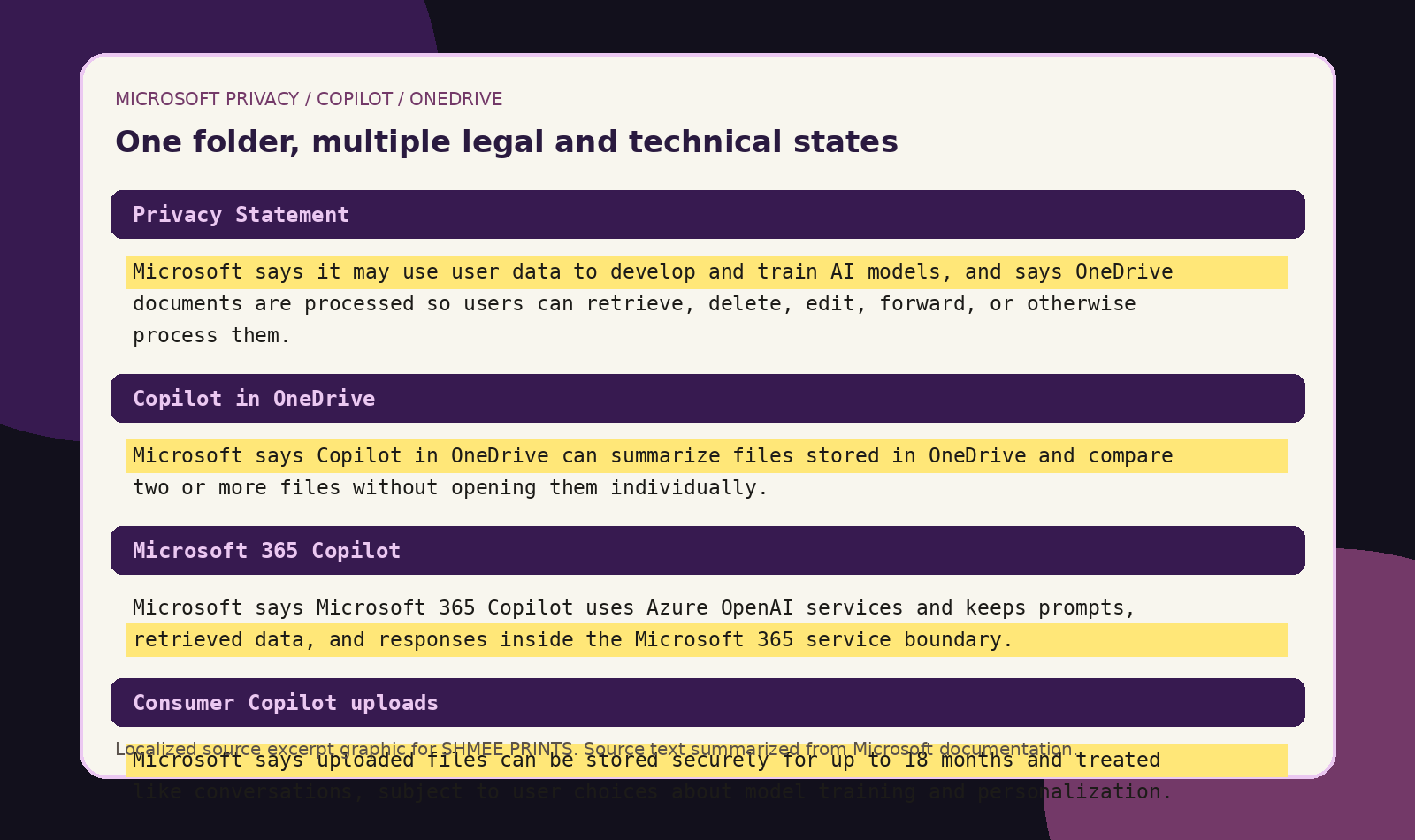
*One folder. Multiple file states. One service stack. Plenty of fine print.*
SOURCES
Microsoft Support: OneDrive Files On-Demand
Microsoft Support: Back up your folders with OneDrive
Microsoft Support: Turn off, disable, or uninstall OneDrive
Microsoft Support: Summarize your files with Copilot
Microsoft Support: Privacy FAQ for Microsoft Copilot
Microsoft Learn: Data, Privacy, and Security for Microsoft 365 Copilot